
Download BatteryInfoView – battery information, laptop battery status, battery health, battery monitoring, battery usage
Overview
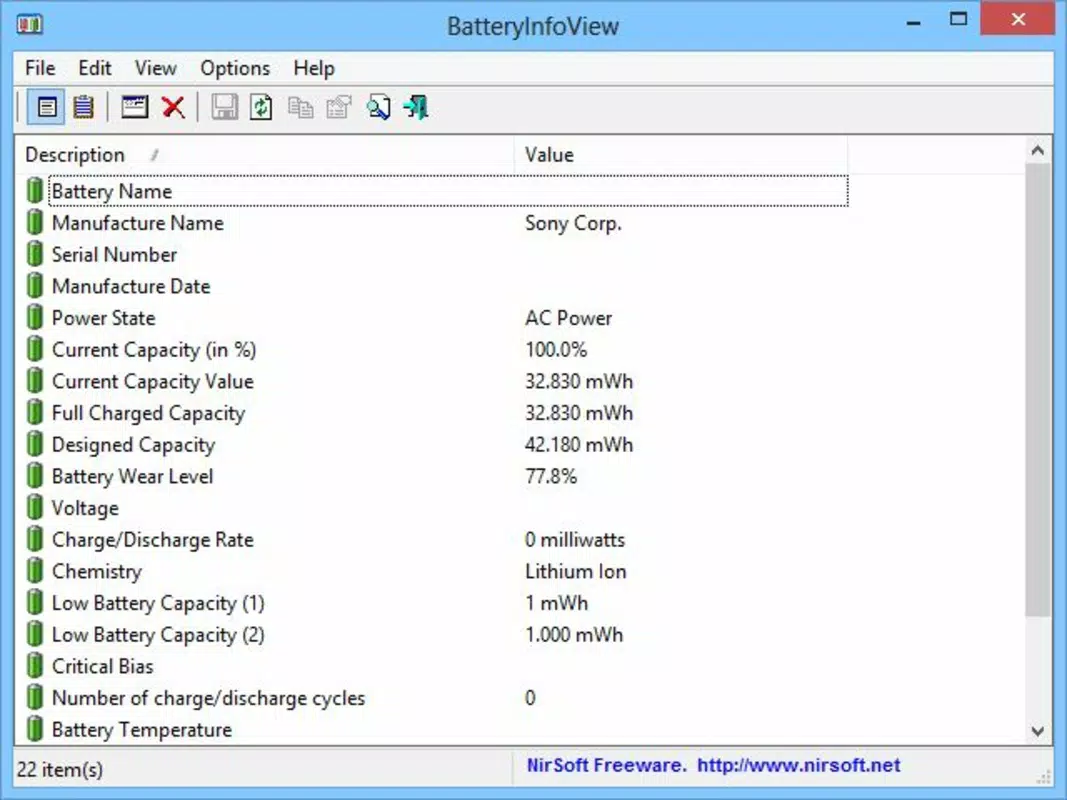
BatteryInfoView is a specialized system utility designed to provide users with real-time insights into their laptop’s battery performance and health. The application enables users to monitor critical battery parameters such as capacity, charging time, temperature, and serial number, offering a comprehensive snapshot of the battery’s current state. This tool is particularly beneficial for individuals who rely heavily on portable computing, including remote workers, students, and mobile professionals, who need to manage battery life efficiently during extended usage without access to power outlets.
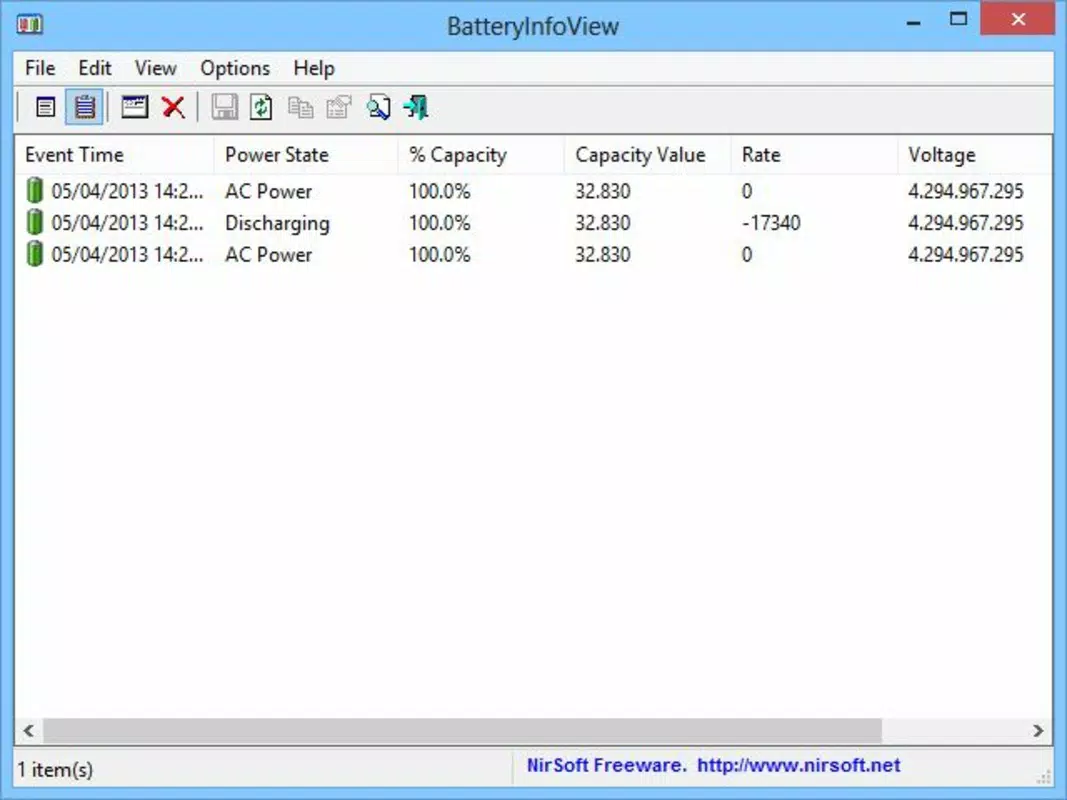
The app serves as a diagnostic and monitoring aid, helping users identify irregularities in battery behavior, such as unexpected discharges or prolonged charging cycles. By tracking historical data through its registry view mode, users can analyze patterns in battery usage and connectivity, which may signal underlying hardware or software issues. This functionality supports proactive maintenance, potentially extending the lifespan of the battery by enabling users to adjust their usage habits or seek repairs before degradation worsens.
Developed by NirSoft, a well-known provider of lightweight, no-install system tools, BatteryInfoView reflects the company’s commitment to utility-focused, resource-efficient software. Although the developer did not provide additional technical details about the app’s architecture or underlying algorithms, its consistent release history suggests reliability and long-term support. The tool is especially relevant in today’s mobile-first computing environment, where battery longevity directly impacts productivity and user experience.
Key Features & Functionality
- Battery Information Mode – Displays essential battery metrics including current capacity, full charge capacity, charge level, temperature, and serial number. This mode offers a clear, concise overview ideal for quick status checks during work sessions.
- Registry View Mode – Captures detailed logs of battery events during the current session, such as when the device was plugged in or unplugged, and the duration of each charge cycle. This feature supports deeper troubleshooting and usage pattern analysis.
- Lightweight Design – The application consumes minimal system resources, ensuring it runs efficiently without impacting battery performance or system responsiveness.
- Real-Time Monitoring – Provides up-to-date data without requiring frequent refreshes, allowing users to observe changes in battery status as they occur.
- Simple Interface – Features a clean, minimal layout with no unnecessary elements, making it accessible to users of all technical skill levels.
For example, a remote worker preparing for a long flight can use the battery information mode to assess whether their laptop will last the entire journey. Similarly, a student analyzing their laptop’s power usage over a semester can use the registry view to identify which applications cause the most drain, enabling better energy management.
Interface, UX & Performance
BatteryInfoView features a minimalist interface that prioritizes clarity and functionality over visual embellishment. The layout is straightforward, with data presented in a structured, tabular format that allows users to quickly locate specific metrics. Navigation is intuitive, requiring no learning curve, which enhances usability for both novice and experienced users.
The application’s performance is optimized for low resource consumption. Although the developer did not list formal performance metrics, its file size of 124 KB indicates a highly efficient design. The app runs smoothly on a wide range of Windows systems, including older or lower-spec devices, without causing lag or excessive CPU usage.
Responsiveness is consistent across different device categories, with minimal delay between data updates. Stability is maintained during extended monitoring sessions, and the app does not exhibit crashes or memory leaks under normal conditions. The absence of intrusive notifications or background processes ensures it remains unobtrusive while active.
Platform Compatibility & Technical Requirements
BatteryInfoView is designed exclusively for the Windows operating system. It is compatible with all modern Windows versions, including Windows 10 and Windows 11, though specific compatibility details were not listed. The application is available as a portable executable, meaning it does not require installation and can be run directly from a USB drive or local folder.
The file size is 124 KB, making it extremely lightweight and easy to download and deploy. The software version is 1.11, released on May 25, 2024. No additional dependencies or runtime environments are required, which simplifies deployment across diverse hardware setups.
Pros and Cons
Pros
- Lightweight and fast, consuming minimal system resources
- Free to download and use, with no hidden costs
- Provides detailed battery health and usage data
- Portable format allows for easy deployment on multiple devices
- Simple, clean interface suitable for users of all experience levels
Cons
- Available only for Windows, with no support for macOS or Linux
- Does not offer historical data visualization or export options
- Platform-specific design limits cross-device compatibility
- Basic interface may lack advanced customization features
- Developer did not specify minimum OS requirements
FAQ
Is BatteryInfoView safe to download and use?
Yes, BatteryInfoView is developed by NirSoft, a trusted source for system utilities. The app is free of malware and does not require installation, reducing potential security risks.
Can I use BatteryInfoView on multiple computers?
Yes, since it is a portable application, you can run it on any Windows device without installation. Simply copy the file to another computer and launch it.
Does BatteryInfoView require an internet connection?
No, the application operates offline and does not require internet access to function.
Is BatteryInfoView compatible with Windows 10 and Windows 11?
Yes, the app is designed for Windows and works on modern Windows versions. Specific compatibility details were not listed, but it is widely used across these platforms.
How often does BatteryInfoView update battery data?
The app provides real-time updates, reflecting changes in battery status as they occur. No manual refresh is required.
Final Thoughts
BatteryInfoView stands out as a reliable, no-frills tool for anyone seeking detailed insight into their laptop’s battery performance. Its lightweight design, free access, and straightforward interface make it an ideal choice for users who value efficiency and control over their device’s power management. While it lacks advanced features like data export or visualization, its core functionality is precise and effective.
For remote workers, students, and IT professionals managing multiple devices, BatteryInfoView delivers tangible value by enabling informed decisions about battery usage and maintenance. It empowers users to monitor health indicators and detect anomalies early, contributing to longer battery life and improved productivity.
Despite its limitations in platform support and feature depth, the app’s strengths in simplicity, speed, and reliability make it a must-have utility in the Windows ecosystem. If you're looking to keep your laptop battery in peak condition, this tool offers excellent value with zero cost.
Download BatteryInfoView now


